


Search
How to Turn Any Email into an Outlook Meeting
Apr 7
1 min read
You might receive an email, and instead of the back and forth, you realise it would be quicker to have a meeting.
In the New Outlook, you don’t have to toggle back and forth between your Inbox and Calendar.
Here is the quickest way to transform an email into a formal meeting invite.
Step 1 - Select the email in your inbox.
Step 2 - Go to the top ribbon and click the Meeting icon (it looks like a calendar with an arrow).
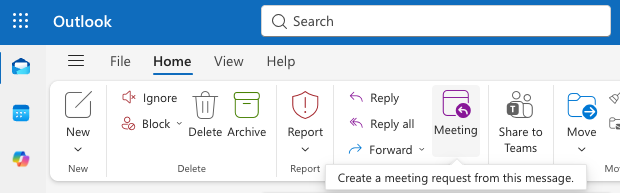
A new meeting window pops up with all the original recipients already added as attendees!
Would you like an even quicker way?
Drag the email you want to convert to a meeting and drop it on the calendar icon on the left side pane.
Top tip: Once you add your attendees, use the scheduling assistant on the right side.


